Release Notes: 2025
Stay up to date with the latest features, improvements, and bug fixes for the Raidiam Connect.
November 2025
New features
Federation: Organisation-Scoped Authorities
-
Authorities are now managed directly inside each Organisation rather than through Reference Data.
-
A new Authorities tab has been added to Organisation Details (visible only to Super Users).
-
New Authorities must be created inside Organisation.
-
Authorities continue to appear in Reference Data, but this section is now read-only for them.
Federation: Role Metadata Expansion
Roles now include the following Federation-required metadata enabling Federation-compatible identity and policy models across the ecosystem:
-
Entity Type
-
Claim Name
-
Policy Operator
-
Data Type
Server Improvements (Part of Federation Changes)
Authorisation Servers now require the Issuer to be provided instead of the .well-known URL.
The Directory automatically builds the correct OpenID Connect Discovery endpoint based on the Issuer value.
Both fields remain visible, but only the Issuer needs to be entered.
Enhanced Server Validations
-
A server cannot be created if the Issuer is already registered in the Directory.
-
The issuer returned in the
.well-knownmetadata must exactly match the configured Issuer.
The above validations ensure consistency and correct identity configuration across all Authorisation Servers.
Contacts Management via Reference Data
-
Contacts can now be created and administered through Reference Data with a new backend endpoint supporting these operations.
-
A new Restricted Contact option allows sensitive contacts to be hidden from the wider ecosystem:
-
Visible only to users of the same Organisation and Super Users.
-
Hidden from all other participants.
-
Contacts: New Creation Flow
The legacy “New Contact” button has been removed. The Contact Creation Wizard is now the only way to create contacts.
Improvements
Organisation Administrators – Responsive Layout
-
Improved responsiveness across desktop, tablet, and mobile.
-
Refinements to spacing, component alignment, and interaction patterns.
UI Updates and Visual Consistency
-
Improved tooltips, placeholders, field borders, tag colours, and neutral UI elements.
-
Introduced horizontal cards in Reference Data.
-
Updated Global Search visuals to align with the design system.
-
Improved empty states across Domains, Roles, Authorities, and Domain Users.
Global Performance and Stability
-
Reduced redundant backend calls across multiple Directory sections.
-
Improved reliability across:
-
Global Search
-
PEM Decoder
-
IDP Activation
-
Domain & Users
-
Organisation logo rendering
-
Versions Modal
-
Added a new Versions modal, accessible from the profile menu.
-
Displays the Directory UI version and includes links to Release Notes and API Documentation.
Contact Information Accuracy
-
Improved handling of Terms & Conditions document status.
-
Increased consistency in contact information rendering.
Bug fixes
-
Fixed certificate details not loading in the PEM Decoder.
-
Fixed Global Search navigation to Certificate details.
-
Fixed visibility of the IDP “Activate” button after approval.
-
Fixed Domain & Users page rendering inconsistencies.
-
Fixed scaling distortions affecting Organisation logos.
-
Corrected Participant API navigation behaviour.
-
Fixed toast message inconsistencies when skipping certificate steps.
September 2025
New features
Just-in-Time (JIT) User Provisioning Upgrades
-
JIT provisioning details are now visible in Organisation Details.
-
Clearer wording has been applied across the Organisations wizard and edit dialogs.
-
JIT users now receive email notifications (e.g., certification expiration).
Global Search Upgrade
Global Search expanded to include Certificates, which can be searched by KID.
Have I Been Pwned (HIBP) Password Checks
-
Connect now uses a copy of the Have I Been Pwned (HIBP) database to check passwords against known breaches.
-
Passwords are checked using k-anonymity.
-
Compromised passwords are rejected during registration, password changes, and authentication.
-
Feature is turned off by default and can be enabled on request.
-
SSO users are not affected.
Improvements
Software Statement Certifications
-
Delete behaviour changed from hard delete to soft delete (no API impact).
-
Affected endpoint:
/organisations/{OrganisationId}/softwarestatements/{SoftwareStatementId}/certifications -
What’s changing:
-
DELETE requests: change status from Active → Inactive.
-
PUT requests: support updating status from Active → Inactive.
-
Once inactive, certifications cannot be reactivated.
-
-
Same logic already applies to Server Certifications.
Cascade Delete for Certification Ttype Variants
-
Affected endpoint:
/references/certificationtypes/{TypeID}/variants/{VariantID} -
When disabling a certification type variant, Super Users can choose whether to cascade delete attached certifications.
-
With cascade: all certifications of that variant type are soft-deleted, and the variant type is disabled.
-
Without cascade: attached certifications remain, but the variant type is disabled (cannot be added going forward).
Clients Endpoint
-
Included additional fields in the Clients endpoint
-
If a field has no value, it is not present in the response.
Wizards & Forms
-
Updated wizard steppers, footers, and dividers for clearer navigation.
-
Steps are hidden once complete, and headings refined for better context.
-
Organisation and Certificates flows enhanced (e.g., clearer required fields, improved revoke interface).
UI polish and Accessibility
Consistency improvements across spacing and contrast (e.g., breadcrumbs), alignment fixes, clearer tooltips/placeholders, improved loaders, and more descriptive empty states.
Certificates
Added "Download Certificate" option post-creation.
Bug fixes
Fixed tooltip and padding inconsistencies.
Deprecations
Platform Guides pages and related components removed.
May 2025
New features
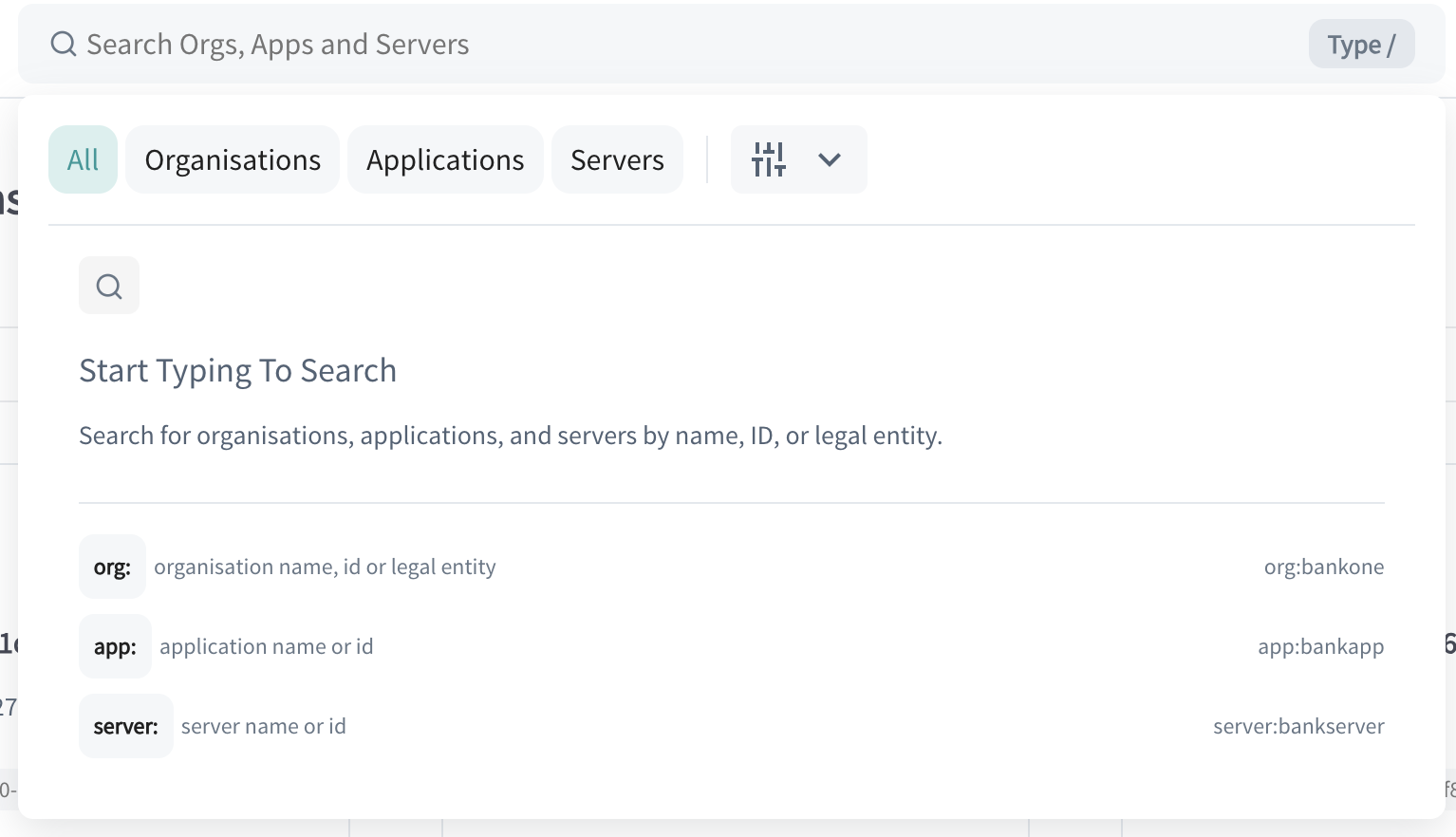
Global Search Bar
A new search bar has been introduced to help users quickly locate key resources-such as organisations, servers, and applications-through a single, unified search interface
This enhancement addresses a common pain point: navigating fragmented information (e.g., finding which organisation a software statement belongs to)
By centralising the search, everyday administrative and support tasks become faster and more efficient
- For our enterprise users, this is limited to only Super and Data Admins. Other users won't be able to see nor interact with the global search
More information on the bar can be found in our docs
Recovery Code Functionality – User Self-Service for MFA Reset
We've introduced a new Recovery Code functionality in the OpenID Provider. When a user logs-in, they will be prompted to generate a set of five one-time-use recovery codes
These codes can be used to reset MFA in case they lose access to their phone or authenticator app.
Example Use Cases:
-
Permanent loss of phone: If a user loses their phone and cannot access the directory, they now have a button that redirects them to the Recovery Code entry screen. By entering one of their codes, they can reset MFA and regain access—without needing Raidiam's support
-
Temporary loss of phone: If a user temporarily doesn't have their phone, they can use a recovery code to log in without resetting MFA, thanks to an optional checkbox in the process
Improvements
-
New field SoftwareVersion has been created that takes in a string. This field is completely independent of the old Version field and we are supporting the two concurrently. Version has been deprecated and will be retired at a later date.
-
SSA software_version field: if SoftwareVersion is set, this value is used. Else, Version is used
-
Clients endpoint: we’re keeping Version for now so as not to break anything.
-
OpenID Provider: Update password validation to restrict weak patterns and repetitive characters.
April 2025
Improvements
-
Pagination Added to Admin Screens
- Pagination has been implemented on the Admin Users and Reference Data Roles Metadata screens to improve performance and usability when handling large datasets
-
Editable Flags for Organisation Admins
-
Organisation Admins can now directly edit feature flags within the Organisation Details page
-
Table Actions Contextual: Action icons in tables are now disabled when the associated action is unavailable, improving clarity and UX
-
"Suspend" Renamed to "Delete": The Server Certification action has been renamed from "Suspend" to "Delete" for better clarity
-
Expanded Auth Method Support: SS/App authentication methods now include options for Federation Management, along with clearly defined required and optional fields
-
Bug fixes
- Clear Error Feedback for Domain Disabling: Users now receive proper feedback messages when attempting to disable a domain that is still in use
March 2025
New features
-
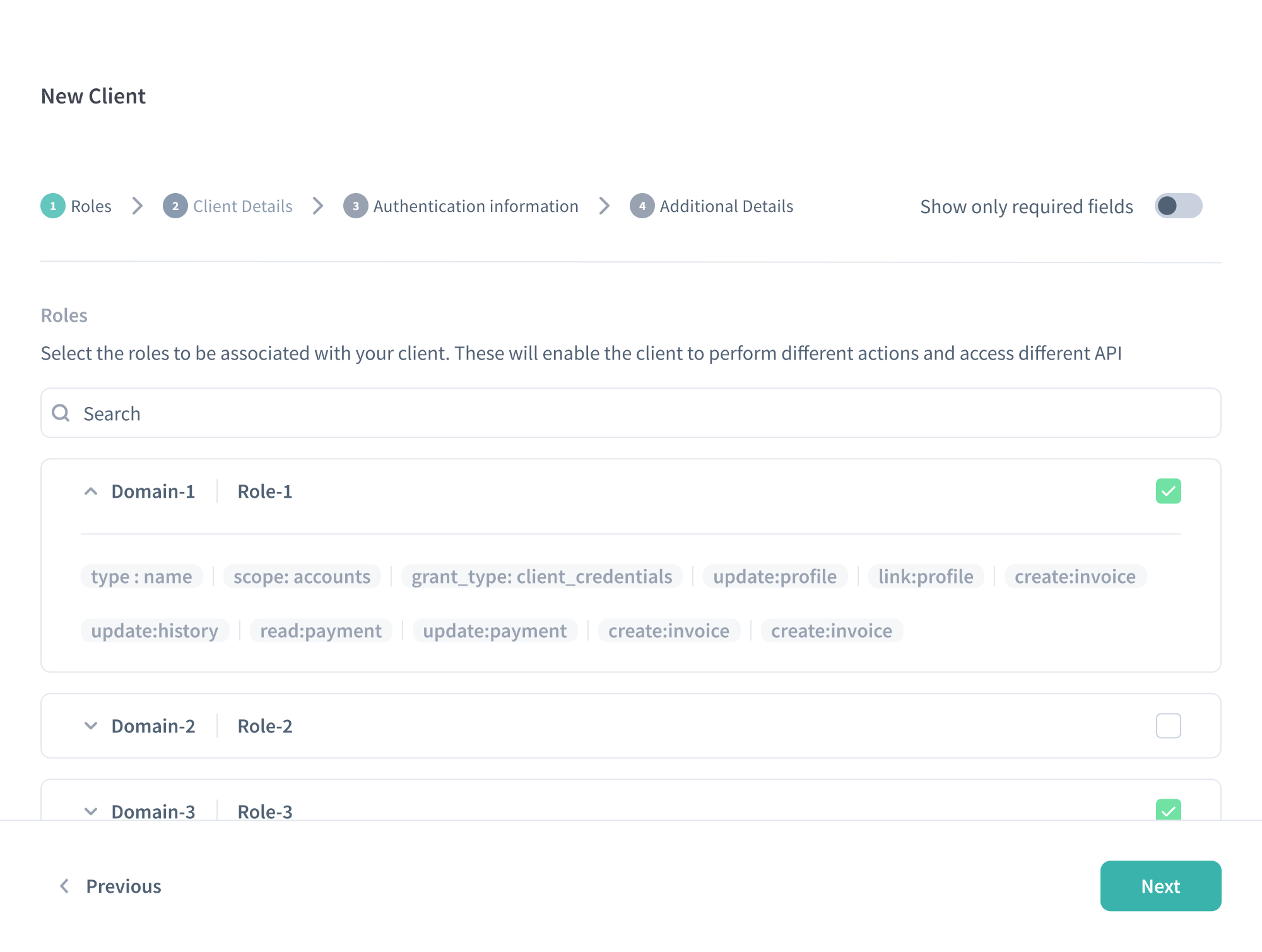
New "Wizard" for Applications and Authorisation Servers
- When creating a new Application or Authorisation Server, a streamlined wizard guides you through the setup process
Improvements
-
Certificates Creation Modal
- The modal for creating certificates (both for Organisations and Applications) has been refined for better usability
-
Pagination Support
-
Most Directory API endpoints now support optional pagination. You can request paginated data for:
-
API Resources
-
Authorisation Domain Metadata
-
Authorisation Servers
-
Authority Claims Authorisation
-
Authority Claims
-
Certifications
-
Organisation Admin Users
-
Organisation Certificate Types
-
Organisation Certificates
-
Software Statement Authority Claims
-
Software Statement Certificates
-
Software Statement Certifications
-
Software Statements
-
Users Certification
-
-
-
User Profile Enhancements
- The "User Profile" section now has an improved layout for easier navigation
-
Active Filters in UI
- Currently selected filters are clearly displayed, allowing you to see and manage active filters at a glance
-
Application Search Enhancements (Software Statements API)
-
You can now filter by ClientName (partial match) and SoftwareStatementId (exact match for UUID)
-
You can also filter by status, an enum defined in Swagger (e.g., Active, Inactive)
-
-
Authorisation Servers & Resources Soft Deletion
- Authorisation Servers, API Resources, and Certifications now use soft delete instead of hard delete
-
Swagger Update
-
New "Status" field for Authorisation Server: Accepts Active or Inactive values
-
Certification Status Fields: The existing "Status" field for Authorisation Server Certifications now only accepts Active or Inactive
-
New "CertificationStatus" field: Added for both Authorisation Server Certifications and Software Statement Certifications
-
"CertificationStatus" enum values: Only accepts Awaiting Certification, Certified, Deprecated, Rejected, Warning, Self*Certified
-
-
Participants Endpoint
- Includes both status and certificationStatus fields following the same values as described above
-
PUT vs. DELETE for Inactivating Resources
-
The UI now sends a PUT request with "Status": "Inactive" instead of a DELETE when disabling an API Resource
-
A DELETE request is still accepted but will also change the resource's status from Active to Inactive
-
Once an API Resource is marked Inactive, no further updates are allowed on that resource
-
-
Support for TLS1.3
-
Audit Data API is now available for ResourceType=SoftwareStatements. This will allow you to get the change history for a specific Software Statement ID, such as:
https://matls-api.sandbox.raidiam.io/audit?resourceType=softwareStatement&OrganisationID=d46bd24f-cc59-48c6-935a-a7724d1ab4d6&resourceID=e43f2bad-8da2-4388-92bf-87c5e3dbf49b
Bug fixes
-
Certifications Tab Visibility
- Fixed an issue where the Certifications tab appeared even when no certifications were configured in Reference Data
-
Reactivating Domain Users
- Fixed a bug where domain users could be reactivated even if they were part of an inactive User System
-
Self*Disable for Domain Users
- Resolved a problem preventing domain users (even if they were organisation admins) from disabling themselves
